Track Hair - Hair Loss Tracker1.6.3
Publisher Description
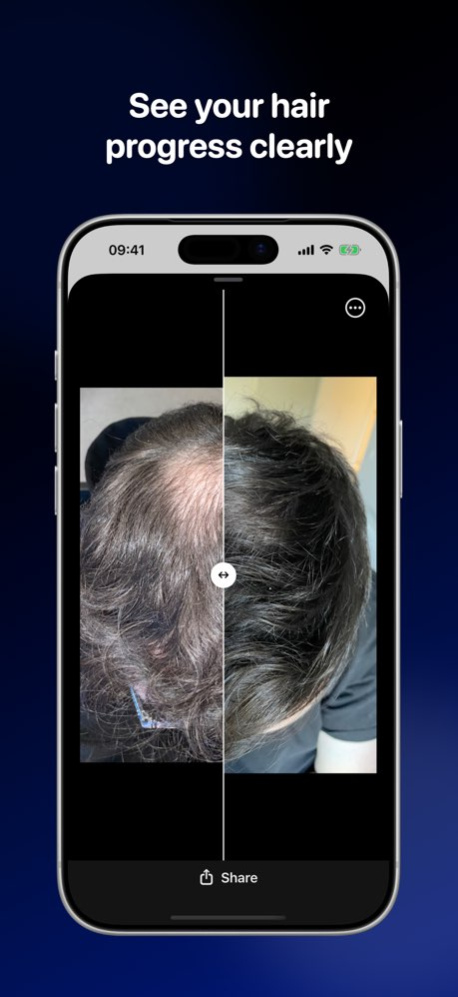


TrackHair is your companion for tracking hair loss treatments, staying consistent with your routine, and seeing progress over time. Whether you use finasteride, minoxidil, microneedling, hair loss shampoo, supplements, PRP or are recovering from a hair transplant, TrackHair helps you stay organised, remember every dose, and clearly see what is working. It is a focused hair loss tracker, hair growth tracker and hair regrowth diary in one app.
STAY CONSISTENT WITH YOUR TREATMENT PLAN
Create a personalised schedule for all of your hair loss treatments:
. Add your medications and build a consistent routine
. Track non-medication treatments such as microneedling, low-level laser therapy (LLLT), PRP and derma rolling
. Include habits like shampoos, conditioners, scalp massages and nutritional supplements
. Set daily, weekly or custom frequencies so your routine matches real life
See a clear daily checklist of everything planned for today. Check off items as you go so you never wonder, “Did I take that already?” again.
CUSTOM SCHEDULES THAT FIT YOUR LIFE
Hair loss plans are rarely one-size-fits-all, so TrackHair lets you:
. Choose which days of the week each treatment appears
. Set “every X days” schedules for non-daily treatments
. Adjust timings, doses, names and notes
. Quickly edit or pause treatments as your plan changes
PROGRESS PHOTOS YOU CAN COMPARE
Small changes in density, hairline and coverage are hard to notice in the mirror. TrackHair makes it easy to capture and organise consistent progress photos:
. Capture front, top, crown and side angles over time
. Store photos in one place, sorted by date
. Scroll back to compare weeks and months
. Build your own before-and-after history
DAILY JOURNAL FOR HOW YOU FEEL
Hair loss treatment is not only about photos. Use notes to record how you feel and what you notice each day:
. Log side effects, mood, sleep and energy
. Add comments about shedding, density, growth and scalp health
. Capture questions to discuss with your dermatologist or doctor
. Build a history you can reference during appointments
CLEAR OVERVIEW OF YOUR JOURNEY
TrackHair turns your routine into an easy-to-review record:
. See past days to confirm what you took and when
. Understand how consistent you have been
. Correlate changes in your hair with changes in your routine
. Keep everything in one app instead of scattered notes and photos
DESIGNED FOR REAL HAIR LOSS JOURNEYS
TrackHair is built for people dealing with:
. Male pattern baldness or receding hairlines
. Thinning hair or diffuse shedding
. Female pattern hair loss
. Hair transplant recovery and maintenance
. Alopecia and other medical hair loss conditions guided by a professional
Whether you are just starting, restarting after a break, or managing a complex multi-treatment routine, TrackHair keeps you organised and informed.
PRIVACY AND CONTROL
Your hair loss journey is personal. TrackHair stores your data on your device and, if enabled, securely in iCloud so you can sync across your Apple devices.
NOT MEDICAL ADVICE
TrackHair does not provide medical advice, diagnosis or treatment and does not replace consultations with a qualified healthcare professional. Always talk to your doctor or dermatologist before starting, stopping or changing any hair loss treatment.
SUBSCRIPTION TERMS
TrackHair offers auto-renewing Annual and Monthly “Pro” subscriptions that unlock premium features and future updates.
Subscriptions automatically renew unless cancelled at least 24 hours before the end of the current period. You can manage or turn off auto-renew in your Apple ID account settings. Refunds are not provided for unused portions of a term.
Privacy policy:
https://www.track.hair/privacy
Terms of service:
https://www.track.hair/terms
Version History • Take follow-up photos up to a week early, with a reminder if a check-in is overdue
• New Timeline shows how long you've been on each treatment
• See all your past hair analyses in one place, with clearer, estimated results
• Imported photos can be filed under the day they were taken
• Undo a logged dose, and cancel treatment edits without saving
• Simpler setup: choose your treatments and when you started them
• Refreshed Today screen, plus better VoiceOver and large text support
• Bug fixes and improvements 1.6.3 17h ago Fixed a crash when opening the app from a notification as well as performance improvements 1.6.2 Sep 30 Bug fixes and improvements 1.6.1 Sep 24 Version 1.6 is the biggest change to Track Hair since launch. The app is built around four tabs now, and there are new ways to see whether you are actually sticking to your routine.
A simpler way around the app
Today is for logging. Routine holds your treatments and reminders. Progress gathers your photos, trends and reports. You is where your settings live.
Log how your hair feels each day
A ten-second check-in for shedding, scalp itch and any side effects. Shedding often spikes in the early months, and recording it means you can watch it settle instead of guessing.
See whether you are sticking to it
Trends shows the share of scheduled doses you have logged over the last 30 days, your current and longest streak, and how long you have been on each treatment.
Mark what you changed, and when
Started microneedling? Moved minoxidil to nights? Record it as a marker and it appears across your trends, so you can see what your routine looked like either side of the change.
A monthly summary of your routine
Each month, a short report of what you logged: doses, streaks, and how long you have kept going. Your own numbers, with nothing read into them.
Something to bring to your dermatologist
Export a dated PDF of your regimen history, adherence, routine changes, photo sets and check-ins, ready to share at an appointment.
Compare any two check-ins
Pick any two photo sets and view them side by side at matching angles, rather than only your starting point against your latest.
Faster, and easier on the eye
Photos load as you scroll, the Progress tab opens straight away, and the whole app has had a fresh pass on spacing, contrast and dark mode.
I build and support Track Hair on my own. If it is helping, a rating goes a long way. If something is not working, email hello@track.hair and I will fix it.
— Darren 1.6 Aug 9 This update makes it even easier to stay close to your progress.
- Turn your photos into a timelapse video and watch your hair journey unfold over time.
- New Lock Screen widgets keep your latest progress just a glance away.
- We’ve also been getting things ready behind the scenes for iOS 27.
- Plus the usual round of bug fixes and performance improvements to keep everything running smoothly.
Thanks for tracking your progress with us. 1.5.5 Jul 24 Bug fixes and improvements 1.5.4 Jul 7 Bug fixes and improvements 1.5.3 Jun 26 Bug fixes & improvements 1.5.2 Jun 18 Bug fixes & improvements 1.5.1 Jun 15 NEW: Progress Reports
Track your hair journey with the new Progress Report feature. Set your baseline with three photos, choose a follow-up date, then compare new photos from the same angles to see how your treatment is progressing over time.
This update also includes several bug fixes and improvements, with major refinements to the AI Scanner for a smoother, more reliable experience. 1.5 Jun 4 Bug fixes and improvements 1.4.1 May 22 Bug fixes and improvements 1.4 Apr 1 Introducing AI Hair Analysis.
This update adds a brand-new AI analysis report to help you understand your hair health at a glance, fully private using on device ML and AI.
- Get an overall hair health score
- See your estimated Norwood stage
- Review scalp density and visibility insights
- Analyze temple setback, hairline recession, and side profile metrics
- View advanced indicators like thinning ratio and weakest-area density
- Share your AI report with your clinician or for personal tracking
- We also included performance improvements and bug fixes to keep your tracking experience smooth. 1.3 Mar 2 - New “Compare” view: pick two progress photos and use the slider to compare them side-by-side
- Small fixes and performance improvements to keep everything running smoothly 1.2 12/09/2025 You can now share your treatment schedule! Tap on the share button just like you can with your photos, and share it with the community or with friends. 1.1 12/05/2025 1.0 12/02/2025
About Track Hair - Hair Loss Tracker
The company that develops Track Hair - Hair Loss Tracker is Darren Tracey. The latest version released by its developer is 1.6.3.
To install Track Hair - Hair Loss Tracker on your iOS device, just click the green Continue To App button above to start the installation process. The app is listed on our website since 2026-10-15 and was downloaded 1 times. We have already checked if the download link is safe, however for your own protection we recommend that you scan the downloaded app with your antivirus. Your antivirus may detect the Track Hair - Hair Loss Tracker as malware if the download link is broken.
How to install Track Hair - Hair Loss Tracker on your iOS device:
- Click on the Continue To App button on our website. This will redirect you to the App Store.
- Once the Track Hair - Hair Loss Tracker is shown in the iTunes listing of your iOS device, you can start its download and installation. Tap on the GET button to the right of the app to start downloading it.
- If you are not logged-in the iOS appstore app, you'll be prompted for your your Apple ID and/or password.
- After Track Hair - Hair Loss Tracker is downloaded, you'll see an INSTALL button to the right. Tap on it to start the actual installation of the iOS app.
- Once installation is finished you can tap on the OPEN button to start it. Its icon will also be added to your device home screen.
Program Details
System requirements
Download information
Pricing
Version History
version 1.6.3
posted on 2026-10-15
Version History • Take follow-up photos up to a week early, with a reminder if a check-in is overdue
• New Timeline shows how long you've been on each treatment
• See all your past hair analyses in one place, with clearer, estimated results
• Imported photos can be filed under the day they were taken
• Undo a logged dose, and cancel treatment edits without saving
• Simpler setup: choose your treatments and when you started them
• Refreshed Today screen, plus better VoiceOver and large text support
• Bug fixes and improvements 1.6.3 17h ago Fixed a crash when opening the app from a notification as well as performance improvements 1.6.2 Sep 30 Bug fixes and improvements 1.6.1 Sep 24 Version 1.6 is the biggest change to Track Hair since launch. The app is built around four tabs now, and there are new ways to see whether you are actually sticking to your routine.
A simpler way around the app
Today is for logging. Routine holds your treatments and reminders. Progress gathers your photos, trends and reports. You is where your settings live.
Log how your hair feels each day
A ten-second check-in for shedding, scalp itch and any side effects. Shedding often spikes in the early months, and recording it means you can watch it settle instead of guessing.
See whether you are sticking to it
Trends shows the share of scheduled doses you have logged over the last 30 days, your current and longest streak, and how long you have been on each treatment.
Mark what you changed, and when
Started microneedling? Moved minoxidil to nights? Record it as a marker and it appears across your trends, so you can see what your routine looked like either side of the change.
A monthly summary of your routine
Each month, a short report of what you logged: doses, streaks, and how long you have kept going. Your own numbers, with nothing read into them.
Something to bring to your dermatologist
Export a dated PDF of your regimen history, adherence, routine changes, photo sets and check-ins, ready to share at an appointment.
Compare any two check-ins
Pick any two photo sets and view them side by side at matching angles, rather than only your starting point against your latest.
Faster, and easier on the eye
Photos load as you scroll, the Progress tab opens straight away, and the whole app has had a fresh pass on spacing, contrast and dark mode.
I build and support Track Hair on my own. If it is helping, a rating goes a long way. If something is not working, email hello@track.hair and I will fix it.
— Darren 1.6 Aug 9 This update makes it even easier to stay close to your progress.
- Turn your photos into a timelapse video and watch your hair journey unfold over time.
- New Lock Screen widgets keep your latest progress just a glance away.
- We’ve also been getting things ready behind the scenes for iOS 27.
- Plus the usual round of bug fixes and performance improvements to keep everything running smoothly.
Thanks for tracking your progress with us. 1.5.5 Jul 24 Bug fixes and improvements 1.5.4 Jul 7 Bug fixes and improvements 1.5.3 Jun 26 Bug fixes & improvements 1.5.2 Jun 18 Bug fixes & improvements 1.5.1 Jun 15 NEW: Progress Reports
Track your hair journey with the new Progress Report feature. Set your baseline with three photos, choose a follow-up date, then compare new photos from the same angles to see how your treatment is progressing over time.
This update also includes several bug fixes and improvements, with major refinements to the AI Scanner for a smoother, more reliable experience. 1.5 Jun 4 Bug fixes and improvements 1.4.1 May 22 Bug fixes and improvements 1.4 Apr 1 Introducing AI Hair Analysis.
This update adds a brand-new AI analysis report to help you understand your hair health at a glance, fully private using on device ML and AI.
- Get an overall hair health score
- See your estimated Norwood stage
- Review scalp density and visibility insights
- Analyze temple setback, hairline recession, and side profile metrics
- View advanced indicators like thinning ratio and weakest-area density
- Share your AI report with your clinician or for personal tracking
- We also included performance improvements and bug fixes to keep your tracking experience smooth. 1.3 Mar 2 - New “Compare” view: pick two progress photos and use the slider to compare them side-by-side
- Small fixes and performance improvements to keep everything running smoothly 1.2 12/09/2025 You can now share your treatment schedule! Tap on the share button just like you can with your photos, and share it with the community or with friends. 1.1 12/05/2025 1.0 12/02/2025
version 1.6.2
posted on 2026-10-08
Version History Fixed a crash when opening the app from a notification as well as performance improvements 1.6.2 Sep 30 Bug fixes and improvements 1.6.1 Sep 24 Version 1.6 is the biggest change to Track Hair since launch. The app is built around four tabs now, and there are new ways to see whether you are actually sticking to your routine.
A simpler way around the app
Today is for logging. Routine holds your treatments and reminders. Progress gathers your photos, trends and reports. You is where your settings live.
Log how your hair feels each day
A ten-second check-in for shedding, scalp itch and any side effects. Shedding often spikes in the early months, and recording it means you can watch it settle instead of guessing.
See whether you are sticking to it
Trends shows the share of scheduled doses you have logged over the last 30 days, your current and longest streak, and how long you have been on each treatment.
Mark what you changed, and when
Started microneedling? Moved minoxidil to nights? Record it as a marker and it appears across your trends, so you can see what your routine looked like either side of the change.
A monthly summary of your routine
Each month, a short report of what you logged: doses, streaks, and how long you have kept going. Your own numbers, with nothing read into them.
Something to bring to your dermatologist
Export a dated PDF of your regimen history, adherence, routine changes, photo sets and check-ins, ready to share at an appointment.
Compare any two check-ins
Pick any two photo sets and view them side by side at matching angles, rather than only your starting point against your latest.
Faster, and easier on the eye
Photos load as you scroll, the Progress tab opens straight away, and the whole app has had a fresh pass on spacing, contrast and dark mode.
I build and support Track Hair on my own. If it is helping, a rating goes a long way. If something is not working, email hello@track.hair and I will fix it.
— Darren 1.6 Aug 9 This update makes it even easier to stay close to your progress.
- Turn your photos into a timelapse video and watch your hair journey unfold over time.
- New Lock Screen widgets keep your latest progress just a glance away.
- We’ve also been getting things ready behind the scenes for iOS 27.
- Plus the usual round of bug fixes and performance improvements to keep everything running smoothly.
Thanks for tracking your progress with us. 1.5.5 Jul 24 Bug fixes and improvements 1.5.4 Jul 7 Bug fixes and improvements 1.5.3 Jun 26 Bug fixes & improvements 1.5.2 Jun 18 Bug fixes & improvements 1.5.1 Jun 15 NEW: Progress Reports
Track your hair journey with the new Progress Report feature. Set your baseline with three photos, choose a follow-up date, then compare new photos from the same angles to see how your treatment is progressing over time.
This update also includes several bug fixes and improvements, with major refinements to the AI Scanner for a smoother, more reliable experience. 1.5 Jun 4 Bug fixes and improvements 1.4.1 May 22 Bug fixes and improvements 1.4 Apr 1 Introducing AI Hair Analysis.
This update adds a brand-new AI analysis report to help you understand your hair health at a glance, fully private using on device ML and AI.
- Get an overall hair health score
- See your estimated Norwood stage
- Review scalp density and visibility insights
- Analyze temple setback, hairline recession, and side profile metrics
- View advanced indicators like thinning ratio and weakest-area density
- Share your AI report with your clinician or for personal tracking
- We also included performance improvements and bug fixes to keep your tracking experience smooth. 1.3 Mar 2 - New “Compare” view: pick two progress photos and use the slider to compare them side-by-side
- Small fixes and performance improvements to keep everything running smoothly 1.2 12/09/2025 You can now share your treatment schedule! Tap on the share button just like you can with your photos, and share it with the community or with friends. 1.1 12/05/2025 1.0 12/02/2025
version 1.6.2
posted on 2026-10-01
Version History Fixed a crash when opening the app from a notification as well as performance improvements 1.6.2 1d ago Bug fixes and improvements 1.6.1 Sep 24 Version 1.6 is the biggest change to Track Hair since launch. The app is built around four tabs now, and there are new ways to see whether you are actually sticking to your routine.
A simpler way around the app
Today is for logging. Routine holds your treatments and reminders. Progress gathers your photos, trends and reports. You is where your settings live.
Log how your hair feels each day
A ten-second check-in for shedding, scalp itch and any side effects. Shedding often spikes in the early months, and recording it means you can watch it settle instead of guessing.
See whether you are sticking to it
Trends shows the share of scheduled doses you have logged over the last 30 days, your current and longest streak, and how long you have been on each treatment.
Mark what you changed, and when
Started microneedling? Moved minoxidil to nights? Record it as a marker and it appears across your trends, so you can see what your routine looked like either side of the change.
A monthly summary of your routine
Each month, a short report of what you logged: doses, streaks, and how long you have kept going. Your own numbers, with nothing read into them.
Something to bring to your dermatologist
Export a dated PDF of your regimen history, adherence, routine changes, photo sets and check-ins, ready to share at an appointment.
Compare any two check-ins
Pick any two photo sets and view them side by side at matching angles, rather than only your starting point against your latest.
Faster, and easier on the eye
Photos load as you scroll, the Progress tab opens straight away, and the whole app has had a fresh pass on spacing, contrast and dark mode.
I build and support Track Hair on my own. If it is helping, a rating goes a long way. If something is not working, email hello@track.hair and I will fix it.
— Darren 1.6 Aug 9 This update makes it even easier to stay close to your progress.
- Turn your photos into a timelapse video and watch your hair journey unfold over time.
- New Lock Screen widgets keep your latest progress just a glance away.
- We’ve also been getting things ready behind the scenes for iOS 27.
- Plus the usual round of bug fixes and performance improvements to keep everything running smoothly.
Thanks for tracking your progress with us. 1.5.5 Jul 24 Bug fixes and improvements 1.5.4 Jul 7 Bug fixes and improvements 1.5.3 Jun 26 Bug fixes & improvements 1.5.2 Jun 18 Bug fixes & improvements 1.5.1 Jun 15 NEW: Progress Reports
Track your hair journey with the new Progress Report feature. Set your baseline with three photos, choose a follow-up date, then compare new photos from the same angles to see how your treatment is progressing over time.
This update also includes several bug fixes and improvements, with major refinements to the AI Scanner for a smoother, more reliable experience. 1.5 Jun 4 Bug fixes and improvements 1.4.1 May 22 Bug fixes and improvements 1.4 Apr 1 Introducing AI Hair Analysis.
This update adds a brand-new AI analysis report to help you understand your hair health at a glance, fully private using on device ML and AI.
- Get an overall hair health score
- See your estimated Norwood stage
- Review scalp density and visibility insights
- Analyze temple setback, hairline recession, and side profile metrics
- View advanced indicators like thinning ratio and weakest-area density
- Share your AI report with your clinician or for personal tracking
- We also included performance improvements and bug fixes to keep your tracking experience smooth. 1.3 Mar 2 - New “Compare” view: pick two progress photos and use the slider to compare them side-by-side
- Small fixes and performance improvements to keep everything running smoothly 1.2 12/09/2025 You can now share your treatment schedule! Tap on the share button just like you can with your photos, and share it with the community or with friends. 1.1 12/05/2025 1.0 12/02/2025
version 1.6.1
posted on 2026-09-24
Version History Bug fixes and improvements 1.6.1 5h ago Version 1.6 is the biggest change to Track Hair since launch. The app is built around four tabs now, and there are new ways to see whether you are actually sticking to your routine.
A simpler way around the app
Today is for logging. Routine holds your treatments and reminders. Progress gathers your photos, trends and reports. You is where your settings live.
Log how your hair feels each day
A ten-second check-in for shedding, scalp itch and any side effects. Shedding often spikes in the early months, and recording it means you can watch it settle instead of guessing.
See whether you are sticking to it
Trends shows the share of scheduled doses you have logged over the last 30 days, your current and longest streak, and how long you have been on each treatment.
Mark what you changed, and when
Started microneedling? Moved minoxidil to nights? Record it as a marker and it appears across your trends, so you can see what your routine looked like either side of the change.
A monthly summary of your routine
Each month, a short report of what you logged: doses, streaks, and how long you have kept going. Your own numbers, with nothing read into them.
Something to bring to your dermatologist
Export a dated PDF of your regimen history, adherence, routine changes, photo sets and check-ins, ready to share at an appointment.
Compare any two check-ins
Pick any two photo sets and view them side by side at matching angles, rather than only your starting point against your latest.
Faster, and easier on the eye
Photos load as you scroll, the Progress tab opens straight away, and the whole app has had a fresh pass on spacing, contrast and dark mode.
I build and support Track Hair on my own. If it is helping, a rating goes a long way. If something is not working, email hello@track.hair and I will fix it.
— Darren 1.6 Aug 9 This update makes it even easier to stay close to your progress.
- Turn your photos into a timelapse video and watch your hair journey unfold over time.
- New Lock Screen widgets keep your latest progress just a glance away.
- We’ve also been getting things ready behind the scenes for iOS 27.
- Plus the usual round of bug fixes and performance improvements to keep everything running smoothly.
Thanks for tracking your progress with us. 1.5.5 Jul 24 Bug fixes and improvements 1.5.4 Jul 7 Bug fixes and improvements 1.5.3 Jun 26 Bug fixes & improvements 1.5.2 Jun 18 Bug fixes & improvements 1.5.1 Jun 15 NEW: Progress Reports
Track your hair journey with the new Progress Report feature. Set your baseline with three photos, choose a follow-up date, then compare new photos from the same angles to see how your treatment is progressing over time.
This update also includes several bug fixes and improvements, with major refinements to the AI Scanner for a smoother, more reliable experience. 1.5 Jun 4 Bug fixes and improvements 1.4.1 May 22 Bug fixes and improvements 1.4 Apr 1 Introducing AI Hair Analysis.
This update adds a brand-new AI analysis report to help you understand your hair health at a glance, fully private using on device ML and AI.
- Get an overall hair health score
- See your estimated Norwood stage
- Review scalp density and visibility insights
- Analyze temple setback, hairline recession, and side profile metrics
- View advanced indicators like thinning ratio and weakest-area density
- Share your AI report with your clinician or for personal tracking
- We also included performance improvements and bug fixes to keep your tracking experience smooth. 1.3 Mar 2 - New “Compare” view: pick two progress photos and use the slider to compare them side-by-side
- Small fixes and performance improvements to keep everything running smoothly 1.2 12/09/2025 You can now share your treatment schedule! Tap on the share button just like you can with your photos, and share it with the community or with friends. 1.1 12/05/2025 1.0 12/02/2025
version 1.6
posted on 2026-09-17
Version History Version 1.6 is the biggest change to Track Hair since launch. The app is built around four tabs now, and there are new ways to see whether you are actually sticking to your routine.
A simpler way around the app
Today is for logging. Routine holds your treatments and reminders. Progress gathers your photos, trends and reports. You is where your settings live.
Log how your hair feels each day
A ten-second check-in for shedding, scalp itch and any side effects. Shedding often spikes in the early months, and recording it means you can watch it settle instead of guessing.
See whether you are sticking to it
Trends shows the share of scheduled doses you have logged over the last 30 days, your current and longest streak, and how long you have been on each treatment.
Mark what you changed, and when
Started microneedling? Moved minoxidil to nights? Record it as a marker and it appears across your trends, so you can see what your routine looked like either side of the change.
A monthly summary of your routine
Each month, a short report of what you logged: doses, streaks, and how long you have kept going. Your own numbers, with nothing read into them.
Something to bring to your dermatologist
Export a dated PDF of your regimen history, adherence, routine changes, photo sets and check-ins, ready to share at an appointment.
Compare any two check-ins
Pick any two photo sets and view them side by side at matching angles, rather than only your starting point against your latest.
Faster, and easier on the eye
Photos load as you scroll, the Progress tab opens straight away, and the whole app has had a fresh pass on spacing, contrast and dark mode.
I build and support Track Hair on my own. If it is helping, a rating goes a long way. If something is not working, email hello@track.hair and I will fix it.
— Darren 1.6 Aug 9 This update makes it even easier to stay close to your progress.
- Turn your photos into a timelapse video and watch your hair journey unfold over time.
- New Lock Screen widgets keep your latest progress just a glance away.
- We’ve also been getting things ready behind the scenes for iOS 27.
- Plus the usual round of bug fixes and performance improvements to keep everything running smoothly.
Thanks for tracking your progress with us. 1.5.5 Jul 24 Bug fixes and improvements 1.5.4 Jul 7 Bug fixes and improvements 1.5.3 Jun 26 Bug fixes & improvements 1.5.2 Jun 18 Bug fixes & improvements 1.5.1 Jun 15 NEW: Progress Reports
Track your hair journey with the new Progress Report feature. Set your baseline with three photos, choose a follow-up date, then compare new photos from the same angles to see how your treatment is progressing over time.
This update also includes several bug fixes and improvements, with major refinements to the AI Scanner for a smoother, more reliable experience. 1.5 Jun 4 Bug fixes and improvements 1.4.1 May 22 Bug fixes and improvements 1.4 Apr 1 Introducing AI Hair Analysis.
This update adds a brand-new AI analysis report to help you understand your hair health at a glance, fully private using on device ML and AI.
- Get an overall hair health score
- See your estimated Norwood stage
- Review scalp density and visibility insights
- Analyze temple setback, hairline recession, and side profile metrics
- View advanced indicators like thinning ratio and weakest-area density
- Share your AI report with your clinician or for personal tracking
- We also included performance improvements and bug fixes to keep your tracking experience smooth. 1.3 Mar 2 - New “Compare” view: pick two progress photos and use the slider to compare them side-by-side
- Small fixes and performance improvements to keep everything running smoothly 1.2 12/09/2025 You can now share your treatment schedule! Tap on the share button just like you can with your photos, and share it with the community or with friends. 1.1 12/05/2025 1.0 12/02/2025
version 1.6
posted on 2026-08-12
Version History Version 1.6 is the biggest change to Track Hair since launch. The app is built around four tabs now, and there are new ways to see whether you are actually sticking to your routine.
A simpler way around the app
Today is for logging. Routine holds your treatments and reminders. Progress gathers your photos, trends and reports. You is where your settings live.
Log how your hair feels each day
A ten-second check-in for shedding, scalp itch and any side effects. Shedding often spikes in the early months, and recording it means you can watch it settle instead of guessing.
See whether you are sticking to it
Trends shows the share of scheduled doses you have logged over the last 30 days, your current and longest streak, and how long you have been on each treatment.
Mark what you changed, and when
Started microneedling? Moved minoxidil to nights? Record it as a marker and it appears across your trends, so you can see what your routine looked like either side of the change.
A monthly summary of your routine
Each month, a short report of what you logged: doses, streaks, and how long you have kept going. Your own numbers, with nothing read into them.
Something to bring to your dermatologist
Export a dated PDF of your regimen history, adherence, routine changes, photo sets and check-ins, ready to share at an appointment.
Compare any two check-ins
Pick any two photo sets and view them side by side at matching angles, rather than only your starting point against your latest.
Faster, and easier on the eye
Photos load as you scroll, the Progress tab opens straight away, and the whole app has had a fresh pass on spacing, contrast and dark mode.
I build and support Track Hair on my own. If it is helping, a rating goes a long way. If something is not working, email hello@track.hair and I will fix it.
— Darren 1.6 3d ago This update makes it even easier to stay close to your progress.
- Turn your photos into a timelapse video and watch your hair journey unfold over time.
- New Lock Screen widgets keep your latest progress just a glance away.
- We’ve also been getting things ready behind the scenes for iOS 27.
- Plus the usual round of bug fixes and performance improvements to keep everything running smoothly.
Thanks for tracking your progress with us. 1.5.5 Jul 24 Bug fixes and improvements 1.5.4 Jul 7 Bug fixes and improvements 1.5.3 Jun 26 Bug fixes & improvements 1.5.2 Jun 18 Bug fixes & improvements 1.5.1 Jun 15 NEW: Progress Reports
Track your hair journey with the new Progress Report feature. Set your baseline with three photos, choose a follow-up date, then compare new photos from the same angles to see how your treatment is progressing over time.
This update also includes several bug fixes and improvements, with major refinements to the AI Scanner for a smoother, more reliable experience. 1.5 Jun 4 Bug fixes and improvements 1.4.1 May 22 Bug fixes and improvements 1.4 Apr 1 Introducing AI Hair Analysis.
This update adds a brand-new AI analysis report to help you understand your hair health at a glance, fully private using on device ML and AI.
- Get an overall hair health score
- See your estimated Norwood stage
- Review scalp density and visibility insights
- Analyze temple setback, hairline recession, and side profile metrics
- View advanced indicators like thinning ratio and weakest-area density
- Share your AI report with your clinician or for personal tracking
- We also included performance improvements and bug fixes to keep your tracking experience smooth. 1.3 Mar 2 - New “Compare” view: pick two progress photos and use the slider to compare them side-by-side
- Small fixes and performance improvements to keep everything running smoothly 1.2 12/09/2025 You can now share your treatment schedule! Tap on the share button just like you can with your photos, and share it with the community or with friends. 1.1 12/05/2025 1.0 12/02/2025
version 1.5.4
posted on 2026-07-23
Version History Bug fixes and improvements 1.5.4 Jul 7 Bug fixes and improvements 1.5.3 Jun 26 Bug fixes & improvements 1.5.2 Jun 18 Bug fixes & improvements 1.5.1 Jun 15 NEW: Progress Reports
Track your hair journey with the new Progress Report feature. Set your baseline with three photos, choose a follow-up date, then compare new photos from the same angles to see how your treatment is progressing over time.
This update also includes several bug fixes and improvements, with major refinements to the AI Scanner for a smoother, more reliable experience. 1.5 Jun 4 Bug fixes and improvements 1.4.1 May 22 Bug fixes and improvements 1.4 Apr 1 Introducing AI Hair Analysis.
This update adds a brand-new AI analysis report to help you understand your hair health at a glance, fully private using on device ML and AI.
- Get an overall hair health score
- See your estimated Norwood stage
- Review scalp density and visibility insights
- Analyze temple setback, hairline recession, and side profile metrics
- View advanced indicators like thinning ratio and weakest-area density
- Share your AI report with your clinician or for personal tracking
- We also included performance improvements and bug fixes to keep your tracking experience smooth. 1.3 Mar 2 - New “Compare” view: pick two progress photos and use the slider to compare them side-by-side
- Small fixes and performance improvements to keep everything running smoothly 1.2 12/09/2025 You can now share your treatment schedule! Tap on the share button just like you can with your photos, and share it with the community or with friends. 1.1 12/05/2025 1.0 12/02/2025
version 1.5.3
posted on 2026-07-02
Version History Bug fixes and improvements 1.5.3 5d ago Bug fixes & improvements 1.5.2 Jun 18 Bug fixes & improvements 1.5.1 Jun 15 NEW: Progress Reports
Track your hair journey with the new Progress Report feature. Set your baseline with three photos, choose a follow-up date, then compare new photos from the same angles to see how your treatment is progressing over time.
This update also includes several bug fixes and improvements, with major refinements to the AI Scanner for a smoother, more reliable experience. 1.5 Jun 4 Bug fixes and improvements 1.4.1 May 22 Bug fixes and improvements 1.4 Apr 1 Introducing AI Hair Analysis.
This update adds a brand-new AI analysis report to help you understand your hair health at a glance, fully private using on device ML and AI.
- Get an overall hair health score
- See your estimated Norwood stage
- Review scalp density and visibility insights
- Analyze temple setback, hairline recession, and side profile metrics
- View advanced indicators like thinning ratio and weakest-area density
- Share your AI report with your clinician or for personal tracking
- We also included performance improvements and bug fixes to keep your tracking experience smooth. 1.3 Mar 2 - New “Compare” view: pick two progress photos and use the slider to compare them side-by-side
- Small fixes and performance improvements to keep everything running smoothly 1.2 12/09/2025 You can now share your treatment schedule! Tap on the share button just like you can with your photos, and share it with the community or with friends. 1.1 12/05/2025 1.0 12/02/2025
version 1.5.2
posted on 2026-06-21
Version History Bug fixes & improvements 1.5.2 2d ago Bug fixes & improvements 1.5.1 5d ago NEW: Progress Reports
Track your hair journey with the new Progress Report feature. Set your baseline with three photos, choose a follow-up date, then compare new photos from the same angles to see how your treatment is progressing over time.
This update also includes several bug fixes and improvements, with major refinements to the AI Scanner for a smoother, more reliable experience. 1.5 Jun 4 Bug fixes and improvements 1.4.1 May 22 Bug fixes and improvements 1.4 Apr 1 Introducing AI Hair Analysis.
This update adds a brand-new AI analysis report to help you understand your hair health at a glance, fully private using on device ML and AI.
- Get an overall hair health score
- See your estimated Norwood stage
- Review scalp density and visibility insights
- Analyze temple setback, hairline recession, and side profile metrics
- View advanced indicators like thinning ratio and weakest-area density
- Share your AI report with your clinician or for personal tracking
- We also included performance improvements and bug fixes to keep your tracking experience smooth. 1.3 Mar 2 - New “Compare” view: pick two progress photos and use the slider to compare them side-by-side
- Small fixes and performance improvements to keep everything running smoothly 1.2 12/09/2025 You can now share your treatment schedule! Tap on the share button just like you can with your photos, and share it with the community or with friends. 1.1 12/05/2025 1.0 12/02/2025
version 1.4
posted on 2026-05-18
Version History Bug fixes and improvements 1.4 Apr 1 Introducing AI Hair Analysis.
This update adds a brand-new AI analysis report to help you understand your hair health at a glance, fully private using on device ML and AI.
- Get an overall hair health score
- See your estimated Norwood stage
- Review scalp density and visibility insights
- Analyze temple setback, hairline recession, and side profile metrics
- View advanced indicators like thinning ratio and weakest-area density
- Share your AI report with your clinician or for personal tracking
- We also included performance improvements and bug fixes to keep your tracking experience smooth. 1.3 Mar 2 - New “Compare” view: pick two progress photos and use the slider to compare them side-by-side
- Small fixes and performance improvements to keep everything running smoothly 1.2 12/09/2025 You can now share your treatment schedule! Tap on the share button just like you can with your photos, and share it with the community or with friends. 1.1 12/05/2025 1.0 12/02/2025
